A mod that removes the camera or mouse smoothing when looking around unarmed. It gives precise mouse movement feel like in GTA V.
After many attempts I finally found the way of removing the annoying camera smoothing when looking around while unarmed, this feature might be a good idea for controller users but for mouse it’s a nightmare, despite the fact that sometimes it can be difficult to run sideways and unholster your weapon and shoot because the camera forces you to look in the direction of the character movement and when aiming it moves your reticle to the side (more about this issue in the posted video).
After removing that smoothing you can freely run in any direction, unholster your gun and shoot precisely without changes in the crosshair position, also giving the sharp mouse/camera feel like in other games like GTA V, IV and most of the 3rd person shooters.
Requirements
Installation
Place “Remove Camera Smoothing” inside your lml folder.
Compatibility and Merge
NOT COMPATIBLE with any mod that changes cameras.ymt.
However, in order to make it compatible with your favorite or custom cameras.ymt mod, i provided the required changes that need to be done in order to merge with your cameras.ymt.
Merge:
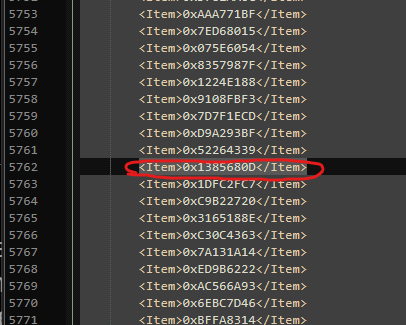
In the camera.ymt file, delete <Item>0x1385680D</Item> located at line 5762. It’s a modifier:
5762 | <Item>0x1385680D</Item>
Recommended mods:
For the best quality of life camera changes in order to give you that shooter feeling and precise aim, I recommend using the following mods along with this mod:
- Custom Sensitivity
- Unlocked Interaction Camera and Duel Free Aim
- No Reticle Spread V2
- No Reticle Sway V2
- Rspect’s Cameras or Stop Screen Shake – Stable Cam (the A_Stop Screen Shake 0.2 version) – If you want to use one of these mods make sure to merge my mod into their cameras.ymt, both removes camera shake and other improvements (chose only one).
I personally built my custom camera mod based on “Stop Screen Shake” and added/removed some changes based on my preferences. If there are people interested in my custom camera, leave a comment and I might consider uploading another mod containing those camera changes.
Credits:
pawnad
If the download link is outdated or doesn't work, you can add your download link. (If your link is valid, we will approve it within 24 hours.)
Download mod
| File | File size |
|---|---|
 Remove Camera Smoothing-1-0
|
72 KB |