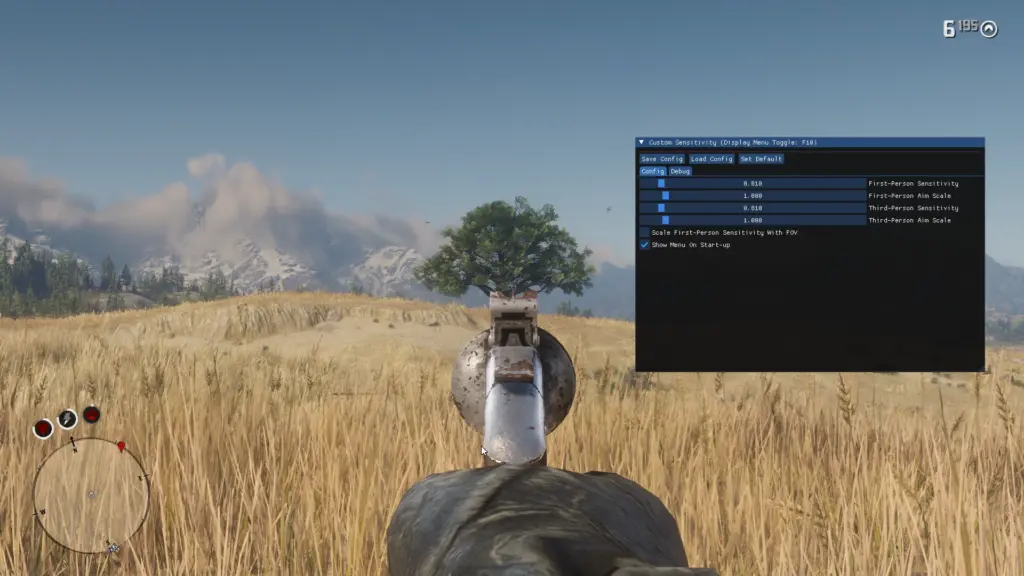
Using the ‘Raw Input’ mouse mode in RDR2, the user can only select from 21 possible mouse sensitivities. This range is often too narrow. That is, the desired sensitivity can often be out-of-range. This forces the user to change their DPI to get close to their desired mouse sensitivity.
This mod allows the user to set their mouse sensitivity to arbitrarily using the an in-game user interface (with the Vulkan API) or a config file.
Prerequisites:
ASI Loader
Installation Steps:
- Download the ‘.zip’ archive for the mod.
- Extract the ‘.zip’ archive.
- Copy CustomSensitivity.asi to your main ‘Red Dead Redemption 2’ directory (beside RDR2.exe).
- Load the game to generate the default config.
- If using Vulkan, you’ll get a UI, which you can toggle with F10.
- If not using Vulkan, the default configuration will be generated upon loading the mod for the first time, which can be edited outside of the game (restart required to load changes)
Usage:
- Edit the configuration file, which lives beside the mod in the Red Dead Redemption 2 installation directory.
- Or, change the configuration in-game if you are using the Vulkan API: F10 to toggle the UI. Use the slider, or click and press ‘TAB’ to type in a value.
To verify that you sensitivity matches your Source Engine sensitivity, you can use a tool like Kovaak’s Sensitivity Matcher: https://www.kovaak.com/sensitivity-matcher/
Changelog:
V2.0.4
Update option name in the UI to be less confusing.
V2.0.2
Fixed Vulkan GPU utilization issue.
V1.5.2
Fix additional Vulkan validation errors.
Credits:
helgot
You can download this mod by clicking here.